Showing posts with label association analysis. Show all posts

05 December 2016

How to Collect and Log Web Clickstream Data


Clickstream Data


What is clickstream data?

The path a user takes through a website is generally referred to as the user's clickstream.


Why collect clickstream data?

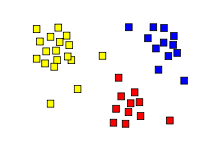
When aggregated using map-reduce techniques and then using unsupervised machine learning predictive analytics techniques like clustering and association analysis, clickstream data can tell you many things, including

  • how users use your site
  • if there are different behavioral groups within users
  • what marketing works or does not work

Clickstream data can also be used to build recommender systems, perform ROI analysis on marketing (via Shapley values), and improve lead scoring


Client-side collection

Since a lot of the traffic to most websites is bot traffic, it is helpful to collect via client-side script as many bots do not evaluate JavaScript and many legitimate bots (e.g. search-engine spiders) identify themselves as such.

A simple method for collection is to add a <script> tag with an immediately-invoked function expression (IIFE) just before the closing </body> tag. An example of such a script is shown below.


The code above simply creates an image tag in code and assigns a source to it. The assignment of a src value causes the browser to fetch the requested resource.

  • Cache busting
    Since many browsers cache static resources, a random value is added to the URL as a cache buster.
  • Referrer
    For the purposes of clickstream data, it is useful to include the URL of the page that caused the current page to be loaded; this is called the "referrer" and is added to the pixel image URL as a parameter named "dr" (the name is "dr" is used to conform to the parameter names used in the Google Analytics Measurement Protocol.


Server-side ASP.NET MVC Listener


Pixel Endpoint

The code on the server side has three primary responsibilities:

  1. to set/update certain cookie values (explained below),
  2. to log the values, and
  3. to return something that the browser will accept (this response will carry the cookies)


Cookies

In general, there are four anonymous values that need to be tracked (if your site allows users to log in, it may be useful to add a fifth cookie to allow you to aggregate cross-device behavior). The values to be tracked/collected are:

  • Session ID
    A temporary anonymous identifier that allows you to group together the page view records captured by the end point. The value will be different each time the user visits your site anew but will remain constant while the user is using your site.
  • Sequence #
    A temporary integer value that allows you to order the page view log records. The value will increment as the user navigates the site.
  • Client ID
    A semi-permanent anonymous identifier that allows you to group together multiple sessions from the same browser/client. NOTE: the value is specific to the browser/machine/user combination: a different logged in user on a machine will have a different client ID; if the same user uses multiple browsers (e.g. Chrome and Firefox), each browser will have a unique client ID.
  • Session count
    A semi-permanent anonymous identifier that allows you to analyze how user behavior changes over subsequent visits.


Getting the value of a cookie from the client request

The code for retrieving a cookie value from the client request is fairly straight-forward. One needs to guard against the case where the cookie does not exist.


Incrementing the sequence value

The "seq" cookie is simply a counter. It, along with the time of the request, which is logged, allows the analyst to study how users navigate a site. Along with the previous page, which is passed up as the "dr" parameter, the sequence value is useful for multi-tab browsing scenarios.


Incrementing the session count

A new session will not have a session ID. If this is the case, the session count needs to be incremented. The session count cookie should be semi-permanent.


Setting the client ID

The client ID should be semi-permanent and should only be set if there is not one already set.


Setting the session ID

The session ID is a temporary value. It's value will be cleared when the user closes the browser. Although it may be tempting to define a session timeout period, since any value chosen will be arbitrary, it is important that the data logged be agnostic and that any session timeout adjustments desired be done during analysis.


Setting cookie values

To safeguard the cookie values and the user, it is important that the cookies be set to be HTTP-only (preventing client script and browser plugin/addon tampering), that the cookies be secure (i.e. HTTPS-only – your site should be HTTPS-only).

To make your pixel useful over all of your web assets, it is helpful to set the domain. Suppose you have domain names like the following:

  • www.example.com
  • blog.example.com
  • response.example.com
To have one pixel connect your users over all of these domains, simply set the domain of the cookie to "example.com".


Logging Values

Given the power of Map-Reduce technologies that are available in Hadoop, R, MongoDB, etc., it makes sense to store the initial data in JSON format.

Four additional pieces of information are added to the serialized data.

  • the time,
  • the user agent
    which is useful for distinguishing mobile from desktop sessions,
  • the page calling the pixel end point, and
  • the referring page that caused the page with the pixel code to be loaded

The code for serializing the values follows:


Full code with unit tests

The full source code for this article is available at https://github.com/stand-sure/Clickstream

31 March 2016

Tay
Many readers will probably be familiar with the recent news story about Microsoft’s AI bot, Tay, that was taught to say hateful things by users (see Microsoft silences its new A.I. bot Tay, after Twitter users teach it racism).


In some news reports, it was mentioned that Tay is an example of unsupervised machine learning.

What is Unsupervised Learning?

In a nutshell, unsupervised learning means “let the data do the talking”. It’s about discovering patterns and relationships.

Common approaches

Examples of systems using Unsupervised Learning that you already know

Two places your business can quickly benefit from unsupervised learning

Lead Scoring

The problem


About half the companies with which Stand Sure works have some form of lead scoring in place. Lead scoring normally means using data to prioritize which prospects and opportunities get salesperson [human?] attention.  Prospects with a score better than a certain value get called on; those below the threshold may get email marketed but generally do not get as much human attention [unless there are insufficient “good” leads].

Every customer lead scoring program that we have encountered to date suffers from the same problem: unreliability -- the scores do not align with outcomes and sales loses faith in the scoring.

The reason for this unreliability is that organizations tend to score leads using explicit factors (some form of BANT (budget, authority, needs & timing) or RWA (ready, willing & able)).  These factors are all necessary for a sale, but they are not sufficient for predicting that one customer is more likely to buy than another. Indeed, in a lot of organizations, the data for these factors is not collected until after a customer has interacted with a salesperson.

Consider, for example, a lead scoring model that based on historical data produces results like the following, where 1=sale and 0=no-sale:


Actual
Model
1
1
1
0
1
1
1
0
0
1
0
0
0
0
0
0
0
0
0
0

The team behind this model reported to management that it was 70% accurate, which is true.  What it failed to report is that the model misclassified 50% of prospects that went on to buy (a 50% false negative rate (FNR)).

Still, 70% sounds pretty good…

When Stand Sure looked at the model, we computed a Coefficient of Determination (R Squared) value, which measures how much of the variance in the actual data is explained by the model.  In the example above, the R2 value was 8⅓%, meaning that the model correctly explained reality very rarely -- a coin toss would have done a better job. (See the Google Sheet at https://goo.gl/iNVIF8 for more statistics from this model).

The solution


  1. More variables
    1. sign-up page
    2. session count
    3. Sign-up day of week
    4. Sign-up time of day data
    5. the number of pages viewed in the sign-up session.
  2. Clickstream cluster analysis
    1. ALL web users were assigned to data-driven groups
    2. For web users who signed up and became leads, cluster assignment was added to the data (it turns out that users that behave the same way online tend to have similar behaviors offline -- in this case, the leads from certain clusters were MUCH more likely to buy).
  3. The company set unit sales records.

Conversion Rate Optimization (a.k.a. Fixing bad website User Experience (UX))

The problem

Most websites ____! Erm, most websites are designed from a vertical-centric point of view and not from a customer-centric POV [if you are contemplating a website design update, it is generally best to NOT work with someone who makes websites for others in your industry -- you will end up in a “sea of sameness” and a set of pages that sells well to people in your industry].

Anecdotally, 90+% of the pages on most sites are visited by only a small fraction of users.

Users get confused & frustrated and leave.
The solution

  1. Association analysis (this technique is normally used for shopping cart analysis -- what items are commonly bought together)
    1. Pages that commonly were consumed together were identified
      1. Where it appeared to the business that the group of pages indicated confusion, content and navigation changes were made
      2. Pages that had high site exit rates were simplified and users were encouraged via navigation cues to get back on a non-exit trajectory.
  2. Once the user experience (UX) was improved via the incremental changes suggested by association analysis, clustering analysis was performed.
    1. The conversion rate to lead for each cluster/group was assessed.
      1. Personas were created to describe the groups based on what content was most consumed by the members of the group.
    2. The page content and navigation was updated to better align with the perceived user intent.
      1. New lead collectors were created to more closely align with the user intent
      2. Downstream email marketing campaigns were designed to keep providing the members of each group with useful content
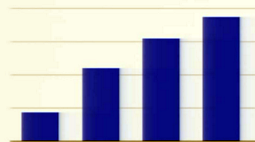
  3. Outcome - exponential lead growth [the image below shows quarterly lead counts -- the digital marketing budget remained constant throughout the period shown]
    growth.png