Showing posts with label clustering. Show all posts

05 December 2016

How to Collect and Log Web Clickstream Data


Clickstream Data


What is clickstream data?

The path a user takes through a website is generally referred to as the user's clickstream.


Why collect clickstream data?

When aggregated using map-reduce techniques and then using unsupervised machine learning predictive analytics techniques like clustering and association analysis, clickstream data can tell you many things, including

  • how users use your site
  • if there are different behavioral groups within users
  • what marketing works or does not work

Clickstream data can also be used to build recommender systems, perform ROI analysis on marketing (via Shapley values), and improve lead scoring


Client-side collection

Since a lot of the traffic to most websites is bot traffic, it is helpful to collect via client-side script as many bots do not evaluate JavaScript and many legitimate bots (e.g. search-engine spiders) identify themselves as such.

A simple method for collection is to add a <script> tag with an immediately-invoked function expression (IIFE) just before the closing </body> tag. An example of such a script is shown below.


The code above simply creates an image tag in code and assigns a source to it. The assignment of a src value causes the browser to fetch the requested resource.

  • Cache busting
    Since many browsers cache static resources, a random value is added to the URL as a cache buster.
  • Referrer
    For the purposes of clickstream data, it is useful to include the URL of the page that caused the current page to be loaded; this is called the "referrer" and is added to the pixel image URL as a parameter named "dr" (the name is "dr" is used to conform to the parameter names used in the Google Analytics Measurement Protocol.


Server-side ASP.NET MVC Listener


Pixel Endpoint

The code on the server side has three primary responsibilities:

  1. to set/update certain cookie values (explained below),
  2. to log the values, and
  3. to return something that the browser will accept (this response will carry the cookies)


Cookies

In general, there are four anonymous values that need to be tracked (if your site allows users to log in, it may be useful to add a fifth cookie to allow you to aggregate cross-device behavior). The values to be tracked/collected are:

  • Session ID
    A temporary anonymous identifier that allows you to group together the page view records captured by the end point. The value will be different each time the user visits your site anew but will remain constant while the user is using your site.
  • Sequence #
    A temporary integer value that allows you to order the page view log records. The value will increment as the user navigates the site.
  • Client ID
    A semi-permanent anonymous identifier that allows you to group together multiple sessions from the same browser/client. NOTE: the value is specific to the browser/machine/user combination: a different logged in user on a machine will have a different client ID; if the same user uses multiple browsers (e.g. Chrome and Firefox), each browser will have a unique client ID.
  • Session count
    A semi-permanent anonymous identifier that allows you to analyze how user behavior changes over subsequent visits.


Getting the value of a cookie from the client request

The code for retrieving a cookie value from the client request is fairly straight-forward. One needs to guard against the case where the cookie does not exist.


Incrementing the sequence value

The "seq" cookie is simply a counter. It, along with the time of the request, which is logged, allows the analyst to study how users navigate a site. Along with the previous page, which is passed up as the "dr" parameter, the sequence value is useful for multi-tab browsing scenarios.


Incrementing the session count

A new session will not have a session ID. If this is the case, the session count needs to be incremented. The session count cookie should be semi-permanent.


Setting the client ID

The client ID should be semi-permanent and should only be set if there is not one already set.


Setting the session ID

The session ID is a temporary value. It's value will be cleared when the user closes the browser. Although it may be tempting to define a session timeout period, since any value chosen will be arbitrary, it is important that the data logged be agnostic and that any session timeout adjustments desired be done during analysis.


Setting cookie values

To safeguard the cookie values and the user, it is important that the cookies be set to be HTTP-only (preventing client script and browser plugin/addon tampering), that the cookies be secure (i.e. HTTPS-only – your site should be HTTPS-only).

To make your pixel useful over all of your web assets, it is helpful to set the domain. Suppose you have domain names like the following:

  • www.example.com
  • blog.example.com
  • response.example.com
To have one pixel connect your users over all of these domains, simply set the domain of the cookie to "example.com".


Logging Values

Given the power of Map-Reduce technologies that are available in Hadoop, R, MongoDB, etc., it makes sense to store the initial data in JSON format.

Four additional pieces of information are added to the serialized data.

  • the time,
  • the user agent
    which is useful for distinguishing mobile from desktop sessions,
  • the page calling the pixel end point, and
  • the referring page that caused the page with the pixel code to be loaded

The code for serializing the values follows:


Full code with unit tests

The full source code for this article is available at https://github.com/stand-sure/Clickstream

30 August 2016

Predicting 2016 Presidential Election Results via Clustering

Goal

The goal of this article is to
  • Predict how undecided states will vote in the 2016 Presidential Election
using
  • U.S. Presidential Election results from 1980 - 2012
  • data indicating which states that are likely to vote for either Mrs. Clinton or Mr. Trump in 2016
The states that are omitted are the undecided states for which predictions are made.

Business Applications

Suppose
  • candidates = products
  • states = consumers
Then the following things can be inferred using the method shown in this article:
  • Consumer Characteristics:
    • Birds of a feather flock together.
    • If data from a new consumer is collected,
      • the new consumer probably shares qualitative/meta traits with the group to which (s)he appears to belong.
    • Different marketing messages might make sense based on the inferred demographic and psychographic traits.
  • Lead scoring:
    • It is likely that new consumers will behave in the same way in the sales process as other members of their group have performed.
    • If the number of prospects exceeds the capacity of sales professionals, prioritizing the prospects in clusters that have historically performed better should improve business results.
  • Preference prediction/Recommender systems:
    • It is likely that if a consumer “likes” a product, (s)he will probably also like another product in the product’s cluster. (“Like” can mean a product view, shopping cart action, purchase, etc.)
      • A “similar products” section (with more domain-specific wording) on the product page(s) on your website may cause users to look at more products (increasing time on site, pages/session and (hopefully) leads and sales).
      • Marketing emails recommending these products may also be useful.

Clustering Overview

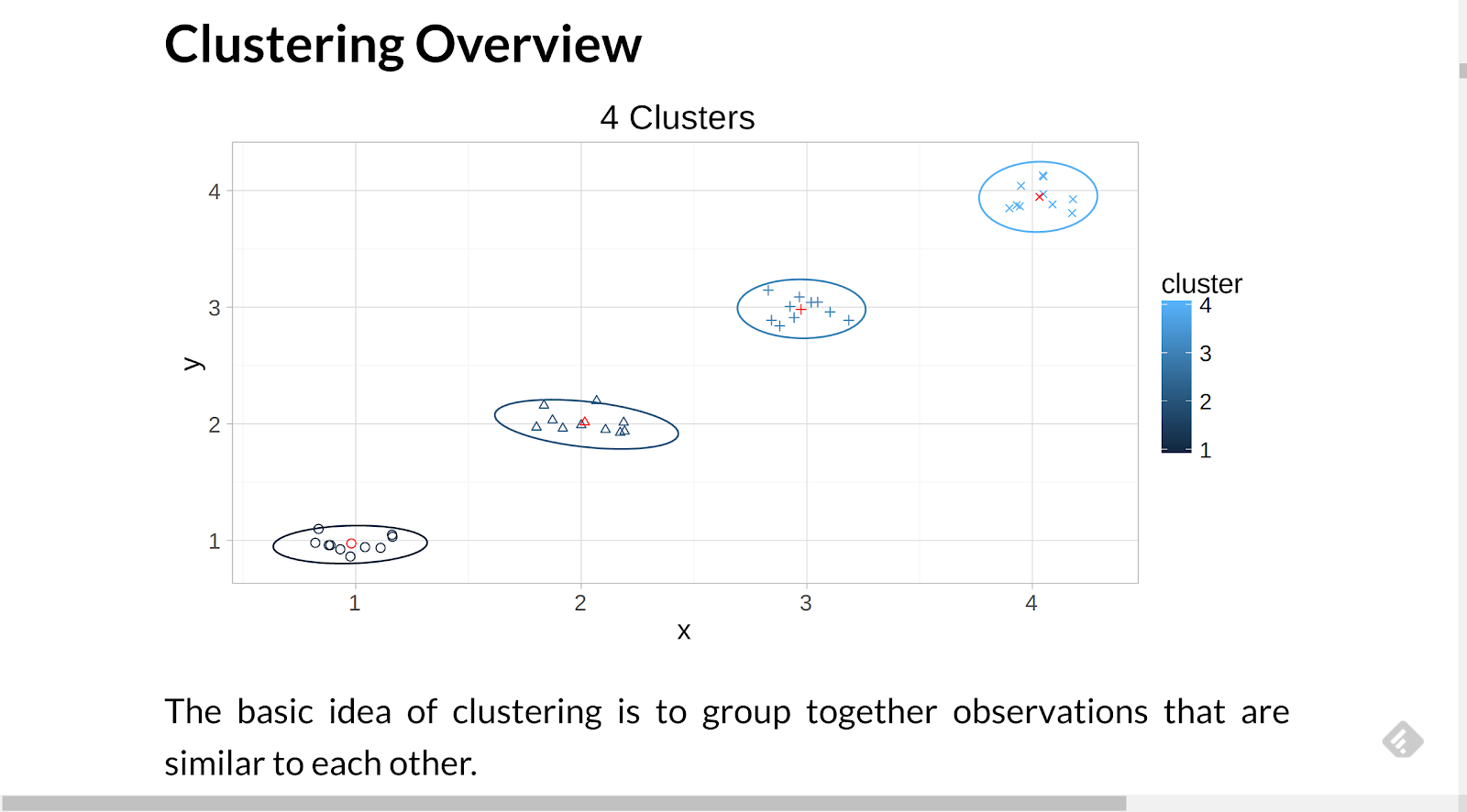
The basic idea of clustering is to group together observations that are similar to each other.

Visually, our brains understand clustering. In the image above, there appear to be four groupings in the data.

When there are more than two variables being observed, an algorithmic approach is useful.

Election Data

The raw election data used in this article is in the form:

 state candidate year votes party
1    AK     Obama 2012     0     D
2    AL     Obama 2012     0     D
3    AR     Obama 2012     0     D
4    AZ     Obama 2012     0     D
5    CA     Obama 2012    55     D
6    CO     Obama 2012     9     D

The data is transformed using functions found in the packages:

To make the code more readable, the pipe operators from the package magrittr are used.

Below is an example of data manipulation.

candidateParty <- results %>%
 select(year, candidate, party) %>%
 distinct() %>%
 arrange(year, candidate, party)

There is a row for each candidate who received electoral college votes for each state in each election year.

Vote Totals

EC Votes by Year and candidate

year
candidate
votes
year
candidate
votes
1980
Carter
49
1996
Dole
159
1980
Reagan
490
2000
Bush
271
1984
Mondale
13
2000
Gore
266
1984
Reagan
524
2004
Bush
286
1988
Bentsen
1
2004
Kerry
251
1988
Bush
426
2008
McCain
173
1988
Dukakis
111
2008
Obama
365
1992
Bush
168
2012
Obama
332
1992
Clinton
370
2012
Romney
206
1996
Clinton
379
NA
NA
NA

Summary Results

Winner by Year

year
candidate
party
1980
Reagan
R
1984
Reagan
R
1988
Bush
R
1992
Clinton
D
1996
Clinton
D
2000
Bush
R
2004
Bush
R
2008
Obama
D
2012
Obama
D

% of time state predicts winner

State
Win Rate
State
Win Rate
State
Win Rate
AK
0.556
KY
0.778
NY
0.667
AL
0.556
LA
0.778
OH
1.000
AR
0.778
MA
0.667
OK
0.556
AZ
0.667
MD
0.667
OR
0.667
CA
0.778
ME
0.778
PA
0.778
CO
0.889
MI
0.778
RI
0.556
CT
0.778
MN
0.444
SC
0.556
DC
0.444
MO
0.778
SD
0.556
DE
0.778
MS
0.556
TN
0.778
FL
0.889
MT
0.667
TX
0.556
GA
0.556
NC
0.667
UT
0.556
HI
0.556
ND
0.556
VA
0.778
IA
0.778
NE
0.600
VT
0.778
ID
0.556
NH
0.889
WA
0.667
IL
0.778
NJ
0.778
WI
0.667
IN
0.667
NM
0.889
WV
0.556
KS
0.556
NV
1.000
WY
0.556

State party rates

State
Dem
Rep
State
Dem
Rep
State
Dem
Rep
AK
0.00
1.00
KY
0.22
0.78
NY
0.78
0.22
AL
0.00
1.00
LA
0.22
0.78
OH
0.44
0.56
AR
0.22
0.78
MA
0.78
0.22
OK
0.00
1.00
AZ
0.11
0.89
MD
0.78
0.22
OR
0.78
0.22
CA
0.67
0.33
ME
0.67
0.33
PA
0.67
0.33
CO
0.33
0.67
MI
0.67
0.33
RI
0.89
0.11
CT
0.67
0.33
MN
1.00
0.00
SC
0.00
1.00
DC
1.00
0.00
MO
0.22
0.78
SD
0.00
1.00
DE
0.67
0.33
MS
0.00
1.00
TN
0.22
0.78
FL
0.33
0.67
MT
0.11
0.89
TX
0.00
1.00
GA
0.22
0.78
NC
0.11
0.89
UT
0.00
1.00
HI
0.89
0.11
ND
0.00
1.00
VA
0.22
0.78
IA
0.67
0.33
NE
0.10
0.90
VT
0.67
0.33
ID
0.00
1.00
NH
0.56
0.44
WA
0.78
0.22
IL
0.67
0.33
NJ
0.67
0.33
WI
0.78
0.22
IN
0.11
0.89
NM
0.56
0.44
WV
0.44
0.56
KS
0.00
1.00
NV
0.44
0.56
WY
0.00
1.00

State Clusters

One question to figure out is how many clusters to use.

If one wants a numeric way to estimate the number of clusters to use the nScree function from the nFactors package, as follows:

states[,-1] %>%
 nFactors::nScree() %>%
 nFactors::plotnScree()
The suggested number of clusters is a good minimum to use.

Since it is important that cluster assignments have business/analytical value, it is generally useful to increase the number of clusters (provided they are stable) until useful distinctions based on other data stand out.

kmeans clustering


kmeans is an automated approach to clustering that works as follows:
  1. k random centers are selected within the bounds of the data (you pick the value of k)
  2. the distance between each data point and each random center is calculated and the data point is assigned to the cluster corresponding to the nearest center
  3. the centers are then recalculated as the mean (a.k.a. average) of the points in the cluster
  4. Steps #2 and #3 are repeated until the centers stop moving (or until the maximum number of iterations allowed is reached (this prevents infinite loops))

It should be noted that different runs of a kmeans algorithm can produce different clusters based on which random centers are used at the beginning of the algorithm. This is an effect of the algorithm and not the data.

In the snippet below, code is shown to calculate 6 clusters from the state data. The first column, which contains the state name, is excluded and only the 0/1 preference columns are used.

The code also shows an easy way to plot clusters, via clusplot from the cluster package [note: clusplot needs more (non-parallel) rows than columns].

set.seed(8675309)
nCenters <- 6
states.km <- states[,-1] %>%
 kmeans(centers = nCenters,
        nstart = 1e2)
clstr <- states.km$cluster

library(cluster)

clusplot2 <- Curry(clusplot,
                  color=T,
                  shade=T,
                  lines=0,
                  labels=2)

clusplot2(states[,-1],
         clstr,
         main = "States")

clusterboot

One of the key clustering challenges is determining if the cluster is “real”.

The centers initially chosen by the kmeans algorithm can impact the result.

One way to see if the clusters are “real” is to see if they hold up when variations of the data are used via a sampling process that allows replacement (this is called bootstrapping).

The clusterboot function in the fpc package performs bootstrap resampling and repeatedly runs the clustering algorithm indicated.

library(fpc)
nRuns = 100

clusterboot2 <- Curry(clusterboot,
                     clustermethod = kmeansCBI,
                     runs = nRuns,
                     iter.max = 1000,
                     seed = 8675309,
                     count = F)

suppressWarnings({
 states.cboot <- clusterboot2(states[,-1],
                              krange = nCenters)
})

clstr <- states.cboot$partition
clusplot2(states[,-1],
         clstr,
         main = "States")
stabilities <- states.cboot$bootmean %>%
 cut(breaks=c(0,
              0.6,
              0.75,
              0.85,
              1),
     labels=c("unstable",
              "measuring something",
              "stable",
              "highly stable"))

Cluster 1 - highly stable - breakdown rate: 0.03

state
demRate
repRate
winRate
CA
0.67
0.33
0.78
CT
0.67
0.33
0.78
DE
0.67
0.33
0.78
IL
0.67
0.33
0.78
MD
0.78
0.22
0.67
ME
0.67
0.33
0.78
MI
0.67
0.33
0.78
NH
0.56
0.44
0.89
NJ
0.67
0.33
0.78
NM
0.56
0.44
0.89
PA
0.67
0.33
0.78
VT
0.67
0.33
0.78

Cluster 1

Dem
Rep
Win
0.66
0.34
0.79

Cluster 2 - stable - breakdown rate: 0.26

state
demRate
repRate
winRate
DC
1.00
0.00
0.44
HI
0.89
0.11
0.56
MN
1.00
0.00
0.44
RI
0.89
0.11
0.56

Cluster 2

Dem
Rep
Win
0.94
0.06
0.5

Cluster 3 - stable - breakdown rate: 0.12

state
demRate
repRate
winRate
IA
0.67
0.33
0.78
MA
0.78
0.22
0.67
NY
0.78
0.22
0.67
OR
0.78
0.22
0.67
WA
0.78
0.22
0.67
WI
0.78
0.22
0.67

Cluster 3

Dem
Rep
Win
0.76
0.24
0.69

Cluster 4 - highly stable - breakdown rate: 0

state
demRate
repRate
winRate
AK
0.00
1.00
0.56
AL
0.00
1.00
0.56
AZ
0.11
0.89
0.67
ID
0.00
1.00
0.56
IN
0.11
0.89
0.67
KS
0.00
1.00
0.56
MS
0.00
1.00
0.56
NC
0.11
0.89
0.67
ND
0.00
1.00
0.56
NE
0.10
0.90
0.60
OK
0.00
1.00
0.56
SC
0.00
1.00
0.56
SD
0.00
1.00
0.56
TX
0.00
1.00
0.56
UT
0.00
1.00
0.56
WY
0.00
1.00
0.56

Cluster 4

Dem
Rep
Win
0.03
0.97
0.58

Cluster 5 - stable - breakdown rate: 0.07

state
demRate
repRate
winRate
AR
0.22
0.78
0.78
GA
0.22
0.78
0.56
KY
0.22
0.78
0.78
LA
0.22
0.78
0.78
MO
0.22
0.78
0.78
MT
0.11
0.89
0.67
TN
0.22
0.78
0.78
WV
0.44
0.56
0.56

Cluster 5

Dem
Rep
Win
0.24
0.76
0.71

Cluster 6 - highly stable - breakdown rate: 0.12

state
demRate
repRate
winRate
CO
0.33
0.67
0.89
FL
0.33
0.67
0.89
NV
0.44
0.56
1.00
OH
0.44
0.56
1.00
VA
0.22
0.78
0.78

Cluster 6

Dem
Rep
Win
0.36
0.64
0.91

Candidate Clusters

Below is the code to create candidate clusters. The first three columns contain non-preference data and are not used in the cluster computation.

Because there are fewer rows than columns, a cluster plot is not possible without some manipulation.

candidates <- results %>%
 spread(state, votes)

candidates[,-c(1:3)] <- ifelse(candidates[,-c(1:3)]>0,1,0)

nCenters <- 8
candidates %<>%
 as.data.frame()
rownames(candidates) <-
 paste(candidates$candidate, candidates$year)
suppressWarnings({
 candidates.cb <- clusterboot2(
   candidates[,-c(1:3)],
   krange = nCenters)
})

# hack to print a candidates graph
# clusplot(candidates[,-c(1:3)], candidates.cb$partition, ...) would fail
# because there are more columns (variables) than rows (observations)
# SVD is a technique used to factor the data into three matrices
# it discovers "latent" variables and concentrates the most significant to be first
# it is useful for reducing the number of dimensions to improve computational time
# the u matrix represents the rows rotated (candidates)
# the d matrix is a diagonal that represents scaling factors (i.e. strength)
# the v matrix represents the columns rotated (states)
# the hack here allows us to have two coordinates to plot
u <- candidates[,-c(1:3)] %>%
 svd() %$%
 u
rownames(u) <- paste(candidates$candidate, candidates$year)
clusplot2(u,
         candidates.cb$partition,
         main = "Candidates")

Cluster 1 - stable - breakdown rate: 0.23

Candidate
Year
Party
Outcome
Gore
2000
D
lose
Kerry
2004
D
lose

Cluster 2 - stable - breakdown rate: 0.21

Candidate
Year
Party
Outcome
Bush
2000
R
win
Bush
2004
R
win

Cluster 3 - highly stable - breakdown rate: 0.12

Candidate
Year
Party
Outcome
Bush
1992
R
lose
Dole
1996
R
lose

Cluster 4 - stable - breakdown rate: 0.31

Candidate
Year
Party
Outcome
Obama
2008
D
win
Obama
2012
D
win

Cluster 5 - stable - breakdown rate: 0.27

Candidate
Year
Party
Outcome
Bush
1988
R
win
Reagan
1980
R
win
Reagan
1984
R
win

Cluster 6 - stable - breakdown rate: 0.17

Candidate
Year
Party
Outcome
Bentsen
1988
D
lose
Carter
1980
D
lose
Dukakis
1988
D
lose
Mondale
1984
D
lose

Cluster 7 - highly stable - breakdown rate: 0.1

Candidate
Year
Party
Outcome
Clinton
1992
D
win
Clinton
1996
D
win

Cluster 8 - stable - breakdown rate: 0.22

Candidate
Year
Party
Outcome
McCain
2008
R
lose
Romney
2012
R
lose

Predictions

To assign a new candidate to a cluster,
  • calculate the distance between each candidate and each cluster center
  • assign the candidate to the cluster with the minimum distance

calcCandidateMostLike <- function (candData) {
 dists <- matrix(NA, nrow = 1, ncol = nCenters)
 for (i in 1:nCenters) {
   ri <- candidates.cb$result$result$centers[i,]
   dri <- rbind(ri, candData) %>%
     dist()
   dists[i] <- dri
 }
 
 mostLike <- dists %>% which.min()
 candidates.cb$result %$%
   data.frame(candidate = names(partition),
              partition = partition) %>%
   filter(partition == mostLike) %>%
   select(candidate)
}

Data from http://projects.fivethirtyeight.com/2016-election-forecast/, gathered a couple weeks ago, is used to create candidate vectors for the 2016 Presidential Election.

For this analysis, for states in the FiveThirtyEight results that prefer a candidate at 60% or more, it will be assumed that the candidate will win the state. States with a smaller preference will be left as undecided and predictions will be made about how they will vote.

# 60% cut off
clinton2016 <- c("Clinton", 2016, "D",
                0, 0, 0, 0, 1, # AK, AL, AR, AZ, CA,
                1, 1, 1, 1, 0, # CO, CT, DC, DE, FL,
                0, 1, 0, 0, 1, # GA, HI, IA, ID, IL,
                0, 0, 0, 0, 1, # IN, KS, KY, LA, MA,
                1, 1, 1, 1, 0, # MD, ME, MI, MN, MO,
                0, 0, 0, 0, 0, # MS, MT, NC, ND, NE,
                1, 1, 1, 1, 1, # NH, NJ, NM, NV, NY,
                0, 0, 1, 1, 1, # OH, OK, OR, PA, RI,
                0, 0, 0, 0, 0, # SC, SD, TN, TX, UT,
                1, 1, 1, 1, 0, # VA, VT, WA, WI, WV,
                0) # WY

trump2016 <- c("Trump", 2016, "R",
              1, 1, 1, 1, 0, # AK, AL, AR, AZ, CA,
              0, 0, 0, 0, 0, # CO, CT, DC, DE, FL,
              1, 0, 0, 1, 0, # GA, HI, IA, ID, IL,
              1, 1, 1, 1, 0, # IN, KS, KY, LA, MA,
              0, 0, 0, 0, 1, # MD, ME, MI, MN, MO,
              1, 1, 0, 1, 1, # MS, MT, NC, ND, NE,
              0, 0, 0, 0, 0, # NH, NJ, NM, NV, NY,
              0, 1, 0, 0, 0, # OH, OK, OR, PA, RI,
              1, 1, 1, 1, 1, # SC, SD, TN, TX, UT,
              0, 0, 0, 0, 1, # VA, VT, WA, WI, WV,
              1) # WY

Ignoring the holdout/undecided states, the current candidates are most similar to the following candidates.

Candidates most like Clinton

candidate
Gore 2000
Kerry 2004

Candidates most like Trump

candidate
McCain 2008
Romney 2012

Using the decided states, we observe the following results for the clusters:

election2016 <- data.frame(state = states$state,
                          stringsAsFactors = F)

election2016$Clinton_2016 <-
 clinton2016[-c(1:3)] %>%
 as.numeric()

election2016$Trump_2016 <-
 trump2016[-c(1:3)] %>%
 as.numeric()

election2016 %<>%
 join(states.cboot$result$partition %>%
        adply(1,
              .id = c("state")),
      by = "state") %>%
 select(state, Clinton_2016, Trump_2016,
        cluster = 4)

cluster2016 <- election2016 %>%
 ddply("cluster", summarise,
       Clinton = sum(Clinton_2016),
       Trump = sum(Trump_2016))

cluster2016 %>%
 kable(caption="Cluster preferences")

Cluster preferences

cluster
Clinton
Trump
1
12
0
2
4
0
3
5
0
4
0
15
5
0
8
6
3
0

To make predictions about the undecided states, assume that undecided states will follow the preference of their historic cluster.

undecidedStates <- election2016 %>%
 ddply("state", summarise,
       votes = Clinton_2016 + Trump_2016) %>%
 filter(votes == 0)

undecidedStates %<>%
 join(election2016, "state") %>%
 select(state, cluster) %>%
 join(cluster2016, "cluster")

undecidedStates %>%
 select(state, cluster) %>%
 kable(caption="Undecided States")

Undecided States

state
cluster
FL
6
IA
3
NC
4
OH
6

The votes from the undecided states to the cluster-favored candidate are assigned as follows:

# assign undecided states based on previous cluster
election2016[election2016$state %in%
              undecidedStates[undecidedStates$Clinton > 0,
                              "state"],]$Clinton_2016 <- 1
election2016[election2016$state %in%
              undecidedStates[undecidedStates$Trump > 0,
                              "state"],]$Trump_2016 <- 1

undecidedStates %>%
 ddply(.(state), mutate,
       VotingFor = ifelse(Clinton > 0,
                          "Clinton",
                          "Trump")) %>%
 select(state, VotingFor) %>%
 arrange(state) %>% kable(caption = "Undecided State Predictions",
                          col.names = c("State","Voting For"))

Undecided State Predictions

State
Voting For
FL
Clinton
IA
Clinton
NC
Trump
OH
Clinton

After the assignment of the undecided states, we see that the current candidates are most like the following.

Clinton most like

candidate
Obama 2008
Obama 2012

Trump most like

candidate
McCain 2008
Romney 2012

Thus, we would conclude that Mrs. Clinton will win.